Where to find itCustomer panel › Advanced › Cron Jobs
Add a cron job
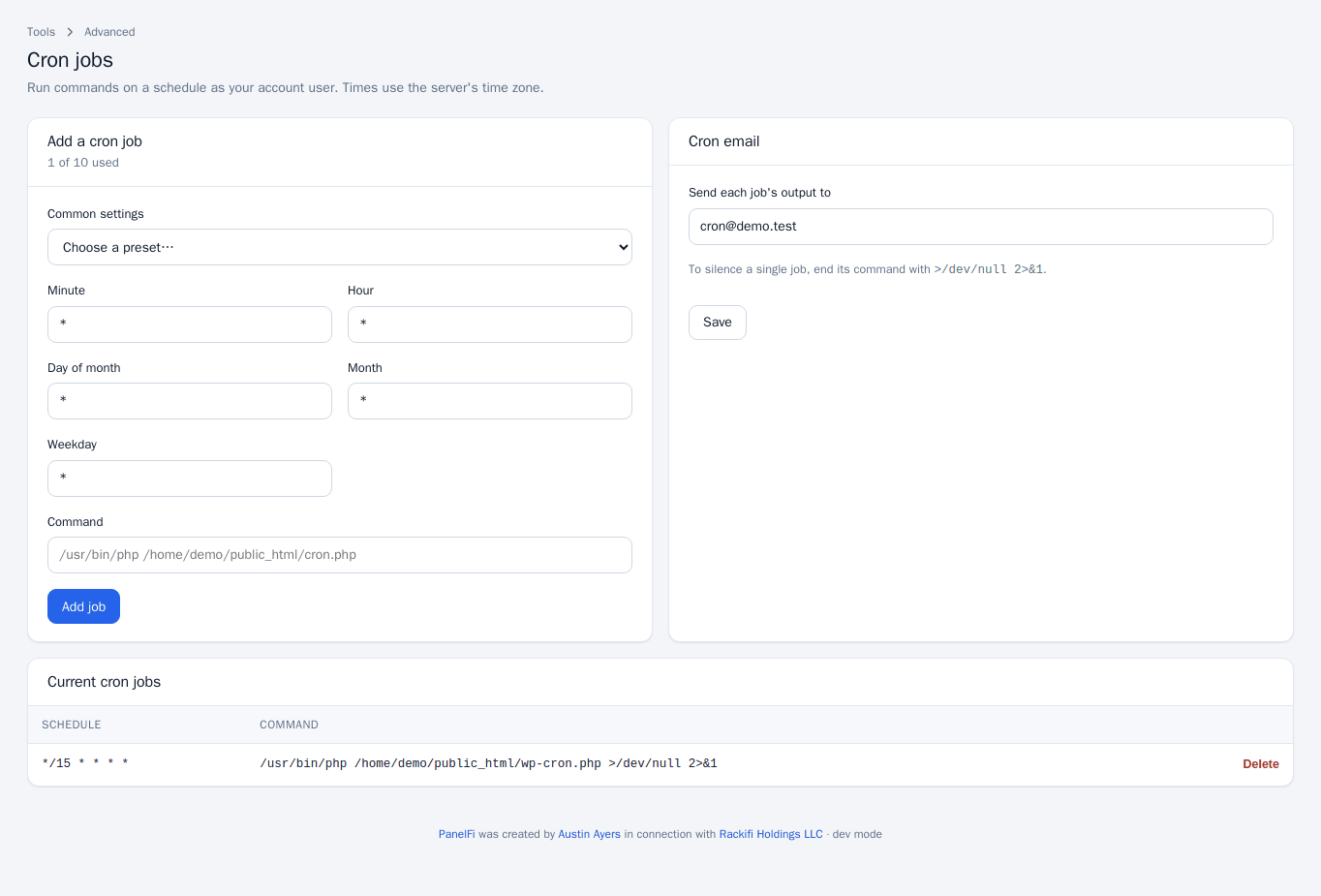
- Open Cron Jobs. The header of Add a cron job shows how many jobs you have used of your package's limit, for example 1 of 10 used.
- Pick a preset under Common settings (once per minute, every 5 or 15 minutes, hourly, every 6 hours, daily at midnight, weekly on Sunday 03:00, monthly), or fill in the five fields yourself: Minute, Hour, Day of month, Month and Weekday.
*means every value. - Type the Command, using full paths, for example
/usr/bin/php /home/youruser/public_html/cron.php. - Press Add job.
Get or silence the output
Under Cron email, enter the address that should receive each job's output and press Save. To silence a single job, end its command with >/dev/null 2>&1.
Review and delete jobs
Current cron jobs lists every schedule and command. Press Delete on a row to remove it.
Notes and limits
- The number of jobs is limited by your hosting package. When you reach it, adding another is refused.
- A job is only saved if it could be installed on the server; if that fails you see an error and nothing is kept.
- For WordPress, the Take over wp-cron.php switch in the WordPress Manager sets up a real cron job for you.
- Cron Jobs can be switched off per package in the Feature Manager.