What it does
ModSecurity inspects every web request. Matching requests get a "403 Forbidden" answer (in On mode) or are only recorded (in Detection only mode). PanelFi manages it on OpenLiteSpeed and NGINX. LiteSpeed Enterprise has its own ModSecurity engine, set up in its WebAdmin console, and the page says so.
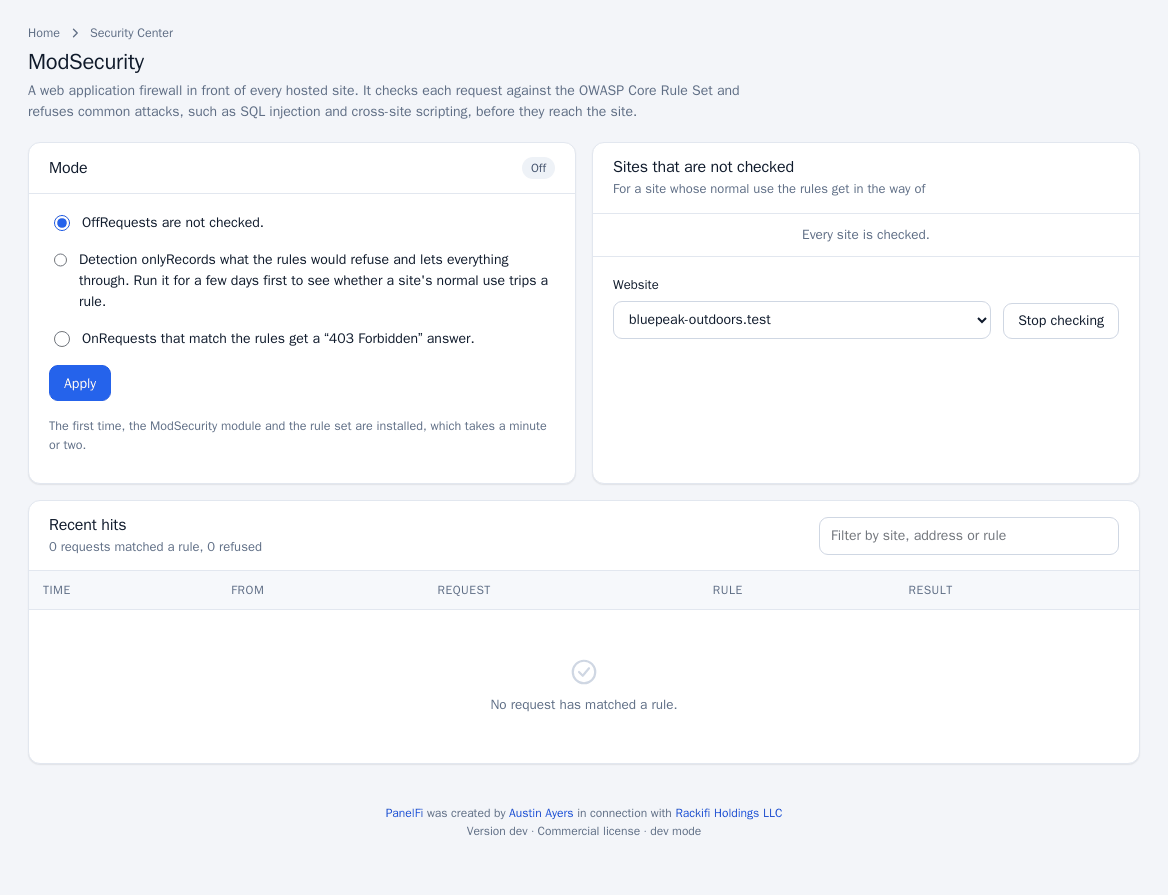
Turn it on
- Open Security Center > ModSecurity.
- Choose a Mode: Off (requests are not checked), Detection only (records what the rules would refuse and lets everything through) or On.
- Click Apply. The first time, the ModSecurity module and the rule set are installed, which takes a minute or two.
Start with Detection only for a few days to see whether a site's normal use trips a rule, then switch to On. If the module for the current web server is not installed, the page tells you requests are not being checked; press Apply to install it.
Exempt a site
For a site whose normal use the rules get in the way of, choose it under Sites that are not checked and click Stop checking. Exempt sites are listed with a Check again button to bring them back.
Review recent hits
The Recent hits table shows requests that matched a rule: time, source address, the host, method and URI, the rule message and id, and whether the request was Refused or Let through. Use it to decide on exemptions.
Notes and limits
- Rules are the OWASP Core Rule Set; the page does not edit individual rules.
- Pair it with brute-force protection, which blocks repeat offenders by address.