What you get
- Malware scanning by account. Imunify lists PanelFi's accounts with their home folders and scans them on demand or on a schedule. ImunifyAV detects malware; ImunifyAV+ and Imunify360 can also clean infected files.
- Imunify's interface in the Server panel at
https://your-hostname:2087/imunify360/, for administrators only. - Imunify360's web application firewall (paid). Its rules, including per-domain rule changes, are loaded through PanelFi's ModSecurity, and the web server is reloaded safely when they change.
Imunify is a separate product with its own license (ImunifyAV is free). PanelFi's built-in Malware Scanner (ClamAV) keeps working alongside it.
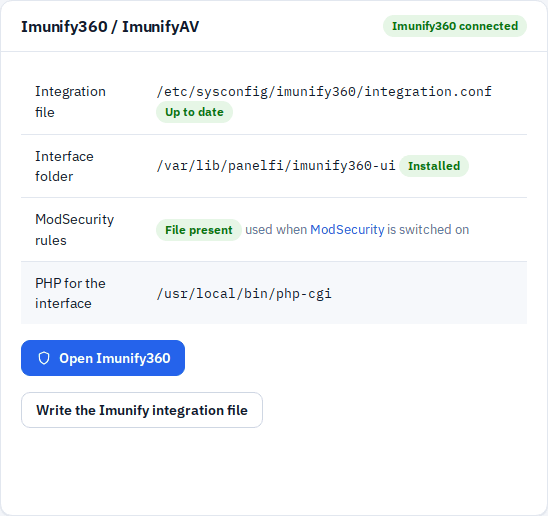
Install
- Open Security Center > CloudLinux & Imunify360 in the Server panel.
- On the Imunify360 / ImunifyAV card, click Write the Imunify integration file. This writes
/etc/sysconfig/imunify360/integration.conf, which tells Imunify where PanelFi's account and domain data and the interface folder are. Do this before running Imunify's installer. - Run Imunify's installer for servers without a control panel, as root:
# ImunifyAV (free)
wget https://repo.imunify360.cloudlinux.com/defence360/imav-deploy.sh -O imav-deploy.sh
bash imav-deploy.sh

# or Imunify360 (licensed)
wget https://repo.imunify360.cloudlinux.com/defence360/i360deploy.sh -O i360deploy.sh
bash i360deploy.sh --key YOUR_KEY
- Reload the page. The card shows connected, the interface folder shows Installed, and Open Imunify360 appears.
Open the interface
Click Open Imunify360. Imunify's interface opens inside the Server panel and asks you to sign in with a system account (Imunify uses the server's own logins, not PanelFi's). Use root and its system password, or a system user listed in /etc/sysconfig/imunify360/auth.admin.
- Only Server panel administrators can reach the interface. Customers and resellers get an error page.
- The interface needs a PHP CGI binary to run. The card's PHP for the interface row shows which one PanelFi uses.
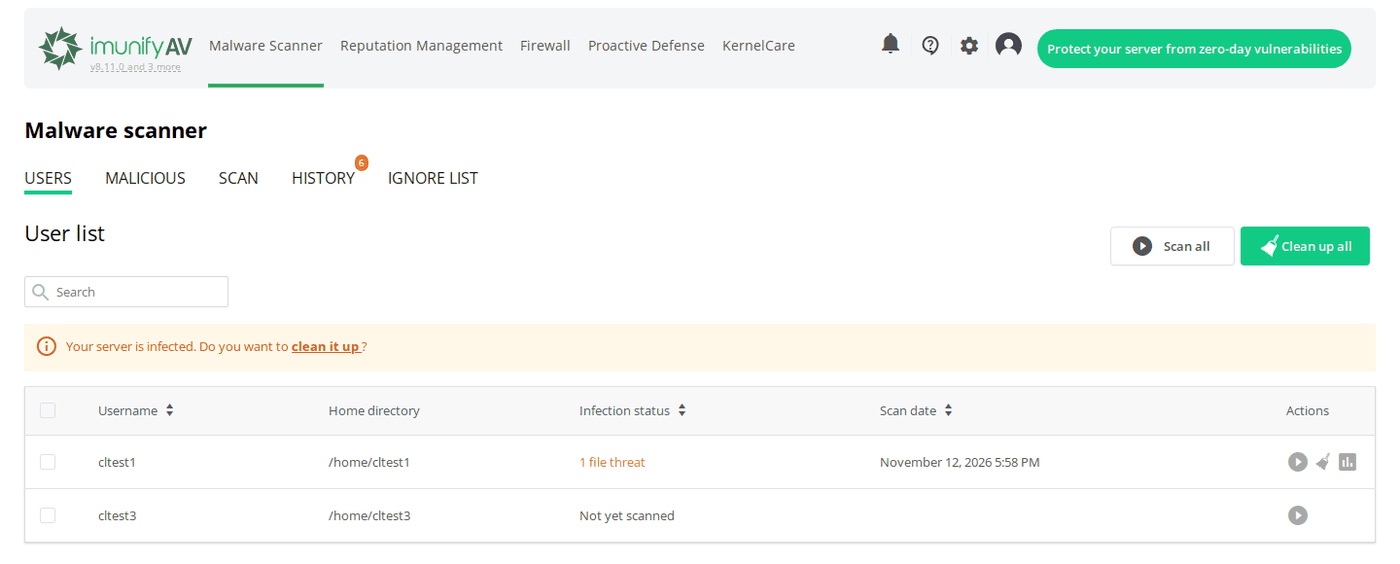
Scan an account
- In Imunify, open Malware Scanner > Users. Every PanelFi account is listed with its home folder.
- Click the scan button on an account's row, or Scan all.
- Results appear under Malicious. With ImunifyAV+ or Imunify360, Clean up cleans the infected files; the free ImunifyAV only reports them.
From the command line: imunify-antivirus malware on-demand start --path /home/USER (ImunifyAV) or imunify360-agent malware on-demand start --path /home/USER (Imunify360).
Firewall rules (Imunify360)
Turn on ModSecurity in PanelFi first (ModSecurity). Imunify360 then installs its rule set, and when it changes the rules for one domain, PanelFi writes them to /etc/panelfi-web/imunify-modsec/ and reloads the web server. If the web server refuses the new rules, the previous ones are put back.
Notes
- Imunify reads PanelFi's account and domain data, refreshed after every change and every ten minutes. Click Write integration files on the same page to refresh it at once.
- If the card shows the integration file as Differs, click Write the Imunify integration file again. This can happen after a PanelFi update.
- Tested with ImunifyAV 8.11 on CloudLinux OS 9.8: accounts listed, test malware found in an account, interface signed in from the Server panel.